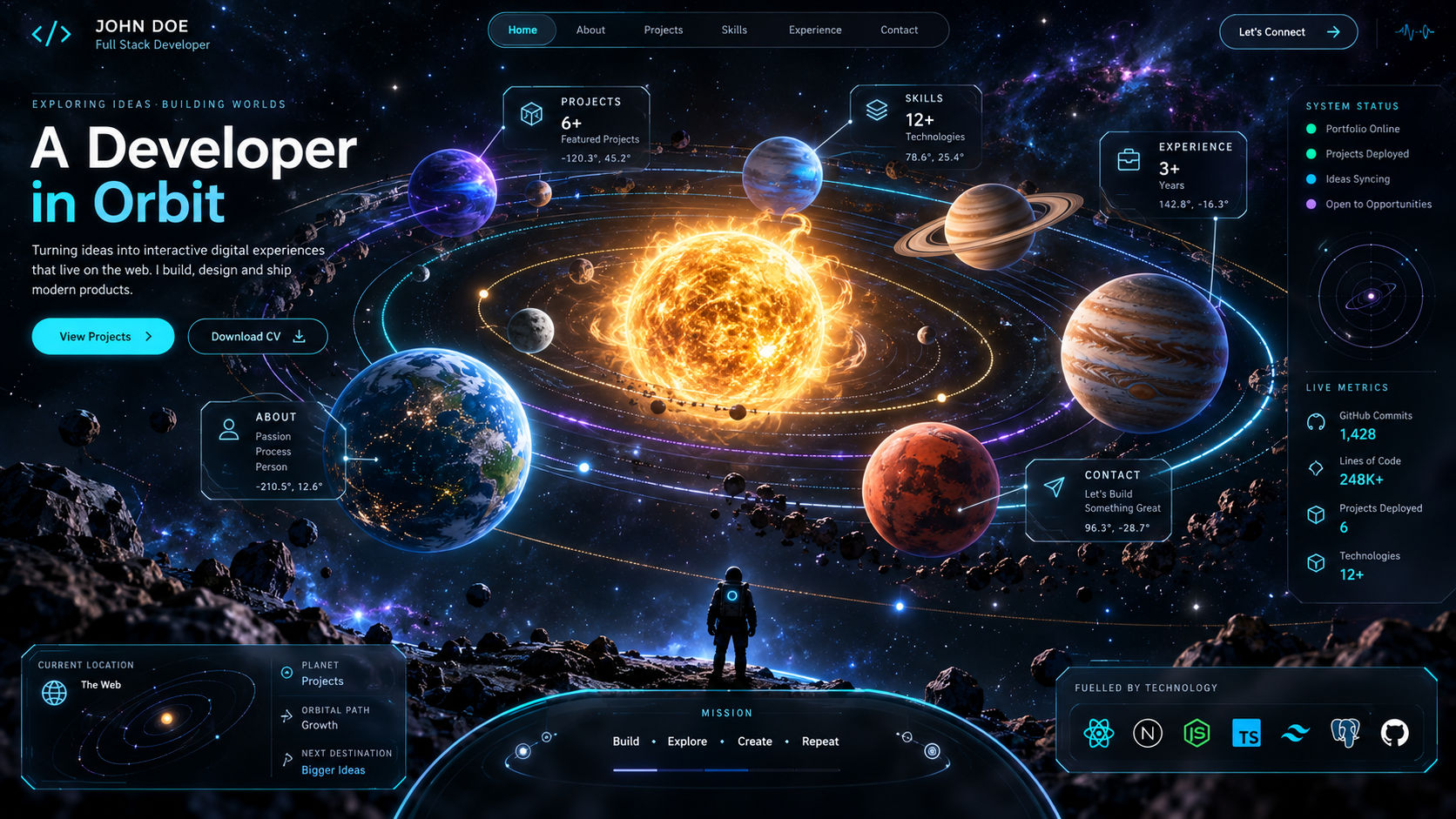
From Sci-Fi to Software: How We Built a Keplerian Solar System 3D Portfolio in WebGL
Why settle for a flat grid of project cards when your portfolio can be an entire planetary system? Inspired by hard sci-fi telemetry interfaces and space exploration simulators, we set out to build an interactive 3D Solar System Portfolio in WebGL—where every planet represents a core project, moons act as tech-stack tags, and the camera flies smoothly between orbits.
Instead of faking planet movement with simple circular rotations, we implemented real Keplerian orbital mechanics, custom atmospheric GLSL shaders, and instanced asteroid belts—all running at a locked 60 FPS in the browser.
Here is the technical breakdown of how we brought astrophysics to the web using Three.js.
1. Implementing True Keplerian Orbits in JavaScript
In many basic 3D scenes, objects orbit a centre point using a simple Math.sin(time) and Math.cos(time) loop at a constant radius. Real planetary systems, however, follow Kepler’s Laws of Planetary Motion: orbits are ellipses with the central star at one focus, and planets sweep out equal areas in equal times (moving faster at perihelion and slower at aphelion).
Calculating Position from Orbital Elements
Each project-planet is configured with key orbital parameters: semi-major axis ($a$), eccentricity ($e$), inclination ($i$), and mean anomaly ($M$). On every frame, we solve Kepler’s Equation ($M = E - e \sin E$) using a quick Newton-Raphson iteration to find the Eccentric Anomaly ($E$), and then map it to 3D Cartesian coordinates:
function getKeplerianPosition(a, e, inclination, meanAnomaly) {
  // Solve M = E - e * sin(E) via 4 Newton-Raphson iterations
  let E = meanAnomaly;
  for (let i = 0; i < 4; i++) {
    E = E - (E - e * Math.sin(E) - meanAnomaly) / (1 - e * Math.cos(E));
  }

  // 2D orbital plane coordinates
  const xOrbit = a * (Math.cos(E) - e);
  const zOrbit = a * Math.sqrt(1 - e * e) * Math.sin(E);

  // Apply orbital inclination (tilt)
  const y = zOrbit * Math.sin(inclination);
  const z = zOrbit * Math.cos(inclination);

  return { x: xOrbit, y, z };
}
This subtle mathematical accuracy gives the solar system an organic, cinematic rhythm that uniform circular loops simply cannot match.
2. Procedural Planets and Atmospheric Fresnel Shaders
Loading six or seven 4K PBR texture sets for different planets would immediately blow up our initial page load budget. To keep the scene lightweight, we combined ultra-compressed KTX2 surface maps with custom GLSL atmospheric shaders.
The Atmospheric Rim Glow
To give terrestrial planets a realistic sci-fi atmosphere, we wrapped a slightly larger sphere (scale: 1.04) around each planet mesh and applied a custom Fresnel fragment shader using additive blending:
// Atmospheric Rim Glow Fragment Shader
varying vec3 vNormal;
varying vec3 vViewPosition;
uniform vec3 uAtmosphereColor;

void main() {
  vec3 viewDir = normalize(vViewPosition);
  float fresnel = pow(1.0 - abs(dot(vNormal, viewDir)), 3.0);
  gl_FragColor = vec4(uAtmosphereColor, fresnel * 0.85);
}
This single shader creates a crisp halo around the edges of each planet that reacts dynamically as the camera orbits around it—using zero extra texture memory.
3. Smooth Camera Warp & Orbital Locking
Navigating a 3D space with free-flight controls often leaves visitors disoriented. To keep the UX intuitive for recruiters and engineers alike, we built a Guided Telemetry Camera System:
- Overview Mode: A top-down angled view showing glowing orbital trajectory lines (
THREE.LineLoop) and HTML HUD labels anchored to each planet via 3D-to-2D screen projection.
- Planetary Lock-On: Clicking a planet or selecting a project from the bottom HUD dock smoothly interpolates the camera's position and
OrbitControls target to track the moving planet in real time.
- Time Dilation on Hover: When a user hovers over a planet to inspect a project, we lerp the global simulation time-scale down to
0.05x, making it effortless to click and read details without chasing a fast-moving target.
4. Rendering 10,000+ Particles Without Dropping Frames
No solar system is complete without a dense starfield and a rocky asteroid belt separating the inner and outer portfolios.
- GPU Instancing for Asteroids: We used
THREE.InstancedMesh to render 3,500 low-poly rock meshes in a single draw call. Instead of updating 3,500 matrices on the CPU every frame, we passed the orbital speed and radius as instance attributes and computed the rotation directly inside the vertex shader.
- Selective Post-Processing: A central star needs a blinding solar corona, but running a full-screen
UnrealBloomPass at high resolution can tank performance on integrated GPUs. We used layer-based selective bloom at half-resolution so only the central star, engine thrusters, and orbital trajectory lines glow, keeping the HUD text razor-sharp.
Key Takeaways for Building Sci-Fi 3D Web Experiences
- Math Beats Heavy Assets: Procedural shaders and physics equations weigh a few kilobytes of code but deliver visual richness that megabytes of baked animations cannot.
- Always Provide a 2D HUD: Pair your 3D canvas with a clean, futuristic HUD overlay so visitors can jump between projects with a single click—without ever getting lost in deep space.