● ENGINEERING DISPATCH•October 29, 2026•13 min read
GitHub Profile vs. Personal Portfolio: Why You Still Need Both to Get Hired
GitHub proves you can write code, but a personal portfolio shows how you turn ideas into real products. Learn why developers need both, what recruiters look for, and how to build a stronger online presence that helps you stand out when applying for jobs.
GitHub Profile vs. Personal Portfolio: Why You Still Need Both to Get Hired
If you're a software developer looking for an internship or your first full-time role, you've probably spent time improving your GitHub profile. Maybe you've pinned your best repositories, added a README, and maintained a contribution streak.
Ready when you are
Your next role starts with a better profile.
Build the portfolio, resume and profile card in one place. Start free, then upgrade only when you need more hosting or AI credits.
Free to startNo credit cardWatermark-free exports
That's a great start. But there's another question worth asking: Can a recruiter understand your skills, your best projects, and the value you bring within a minute of discovering you online?
That's where a personal portfolio comes in.
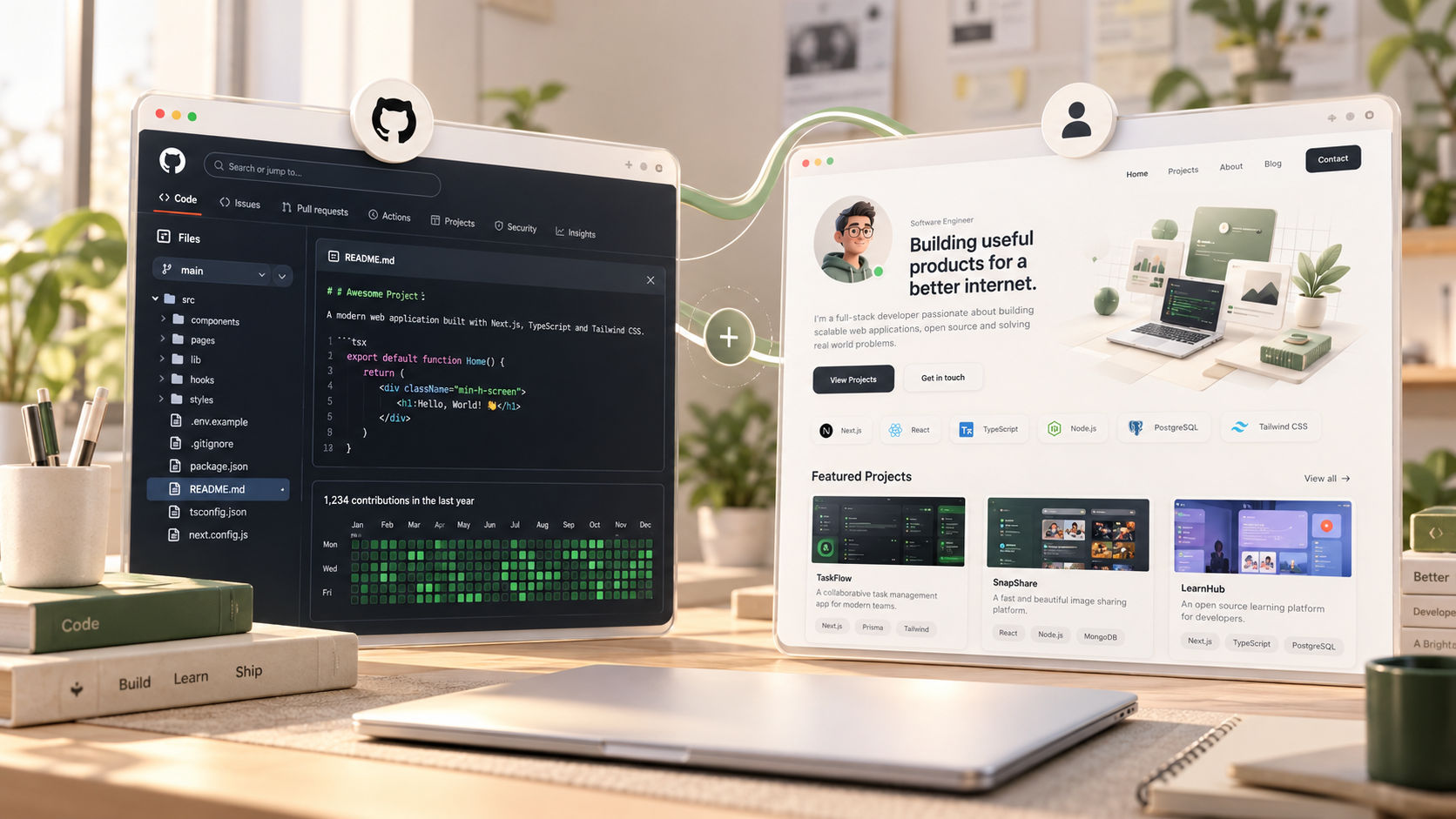
GitHub and a personal portfolio serve different purposes. One provides evidence of your code and development activity. The other helps people understand your work, your thinking, and your potential. Neither replaces the other.
In this guide, we'll explore the differences, what recruiters can learn from each, and how to use both effectively when applying for developer roles.
1. What Does Your GitHub Profile Tell Recruiters?
GitHub is a place to host code, collaborate with other developers, track issues, and contribute to open-source projects. For technical hiring, it can be a valuable source of evidence.
A well-maintained GitHub profile can demonstrate:
Coding ability: Your source code, functions, architecture, and implementation choices.
Problem-solving: How you approach technical challenges and organize solutions.
Consistency: Your ongoing work and participation in projects, when visible.
Collaboration: Pull requests, code reviews, issues, and contributions to shared repositories.
Technical range: The languages, frameworks, tools, and technologies you've used.
For example, suppose you've built a task management application using React, Node.js, Express, and PostgreSQL. Your GitHub repository can show the implementation, database queries, API routes, validation logic, and project structure.
A recruiter or engineer who wants to investigate your technical work can dig into those details.
Where GitHub falls short
A repository doesn't always tell the whole story.
A hiring manager might open your project and find hundreds of files without knowing where to start. They might not understand what problem the application solves, which features you implemented, or whether the project is actually usable.
Other common issues include:
Repositories with little or no documentation.
Projects that are difficult to run locally.
No screenshots or live demos.
Several unfinished projects competing for attention.
Strong technical work hidden among tutorial exercises and experiments.
Your code might be excellent, but the person reviewing it shouldn't have to reconstruct the entire story themselves.
2. What Does a Personal Portfolio Do Differently?
A personal portfolio is your curated professional introduction. It brings your strongest work, technical skills, experience, achievements, and contact information together in one accessible place.
Unlike a GitHub profile, your portfolio lets you decide exactly what visitors see first and how they navigate your work.
A strong developer portfolio typically includes:
A clear introduction: Who you are, what you build, and what roles interest you.
Selected projects: A few substantial projects with meaningful explanations.
Live demonstrations: Links that let visitors experience your applications.
Technical decisions: The problems you solved and why you chose particular technologies.
Achievements and experience: Internships, hackathons, open-source contributions, or relevant accomplishments.
Contact information: An easy way for recruiters and potential collaborators to reach you.
Links to supporting evidence: GitHub repositories, deployed projects, and professional profiles.
Imagine a recruiter visiting your portfolio and seeing a working SaaS application, a short explanation of its architecture, a few screenshots, and a link to its source code.
They can understand the project before opening the repository.
That's the main advantage of a portfolio: it provides context for your technical work instead of simply listing it.
3. GitHub vs. Personal Portfolio: What's the Difference?
| Factor | GitHub Profile | Personal Portfolio |
|---|---|---|
| Primary purpose | Showcase code and collaboration | Present your professional story and best work |
| Source code | Direct access to repositories | Links to selected repositories |
| Project explanation | Usually in README files and documentation | Curated case studies and project summaries |
| Live demos | Can link to deployments | Can prominently feature working demos |
| Design control | Limited to GitHub's interface | Extensive control over layout and presentation |
| Professional identity | Developer activity and technical contributions | Skills, interests, experience, achievements, and goals |
| Customization | Repository and profile customization | Custom branding, domain, layout, and navigation |
| Best use | Technical investigation | First impression and project discovery |
These tools overlap in some areas, but they aren't interchangeable.
GitHub is where someone can inspect how you built something. Your portfolio is where they can quickly understand what you built, why it matters, and where to explore further.
4. Why Recruiters Benefit From Seeing Both
Hiring processes vary across companies. Some recruiters start with a resume, others review LinkedIn, and technical interviewers may go straight to GitHub. There isn't one universal hiring workflow.
Still, having both a portfolio and a GitHub profile makes your work easier to evaluate.
A portfolio creates the first impression
Recruiters often have limited time to review applications. A clear portfolio helps them quickly identify your strongest projects, relevant skills, and professional interests.
Instead of making visitors search through every repository, you guide them towards the work most relevant to the role.
GitHub provides technical evidence
Once a project catches their attention, reviewers can inspect the source code, documentation, commit history, tests, and collaboration activity where available.
A polished portfolio makes claims about your work. A good repository helps substantiate them.
Together, they tell a more complete story
Consider a full-stack developer who has built an expense tracker.
Their portfolio explains the problem, highlights the core features, shows the live application, and describes the technical decisions behind it.
Their GitHub repository contains the React components, API implementation, database schema, authentication logic, and setup instructions.
The portfolio answers, "What did you build, and why should I care?"
GitHub helps answer, "How did you build it, and how well is it implemented?"
Neither guarantees an interview, but together they give reviewers a clearer picture of your abilities.
5. What Should You Put in Your Developer Portfolio?
You don't need dozens of projects or a complicated 3D website to create a compelling portfolio. You need a small number of projects that demonstrate relevant skills and are easy to understand.
Choose three to five strong projects
Prioritize projects that show different aspects of your development ability.
For example:
A full-stack application: Demonstrates frontend development, backend APIs, authentication, and database design.
A technically challenging project: Shows problem-solving, performance optimization, integrations, or system design.
A project with real users or practical value: Demonstrates that you've built something beyond a tutorial.
An open-source contribution or team project: Highlights collaboration and code quality, if applicable.
These are suggestions, not strict requirements. Two well-executed projects can be more convincing than ten unfinished ones.
Write useful project descriptions
For each project, explain the following:
The problem: What were you trying to solve?
Your solution: What does the application do, and who benefits from it?
Your contribution: Which parts did you personally design or implement?
The technology: Which languages, frameworks, databases, or services did you use, and why?
The outcome: What improved, what did you learn, or what measurable result did you achieve?
The evidence: Where can someone see the live application and inspect the code?
For example, instead of writing:
"Expense Tracker | React, Node.js, MongoDB"
Write something more informative:
"Built a full-stack expense tracker that lets users categorize transactions, review spending patterns, and monitor monthly budgets. Implemented REST APIs, authentication, and persistent storage. Explore the live application or inspect the source code."
Only include features and results that your project genuinely supports. If you don't have measurable outcomes, explain the engineering challenges you solved instead.
6. How to Make Your GitHub Profile Recruiter-Friendly
Your portfolio attracts attention, but don't neglect the repositories behind it.
Write a useful profile README
Introduce yourself in a few sentences. Mention your development focus, strongest technologies, selected projects, and relevant links.
Avoid filling the page with decorative badges that don't communicate anything meaningful.
Pin your best repositories
Choose projects relevant to the jobs you want. Put your strongest and most complete work first.
A recruiter shouldn't have to scroll through every experiment to discover your best application.
Improve repository documentation
A good README should usually cover:
What the project does and why it exists.
Its key features.
The technology stack.
Prerequisites and setup instructions.
Environment variables required to run it, without exposing secrets.
Screenshots or a demo link, when useful.
Important architectural decisions or known limitations.
Make your code easy to explore
Use meaningful filenames, a sensible folder structure, clear naming, and appropriate error handling. Add tests where they provide value.
You don't need an elaborate enterprise architecture for a student project. You do need to demonstrate that you've thought about maintainability and reliability.
Show genuine contributions
Contribution graphs can offer useful context, but a high number of commits doesn't automatically indicate strong engineering ability.
Prioritize meaningful work, clear documentation, and projects you can confidently explain in an interview.
7. Should You Build a Portfolio Website From Scratch?
Not necessarily.
You have several options depending on your skills, available time, and goals.
Option 1: Build it yourself
If you're learning frontend development, creating your own portfolio with React, Next.js, or another familiar framework can be a useful project.
You'll have complete control over the design, interactions, content, and domain. You can also use the site to demonstrate your frontend skills.
However, don't spend weeks perfecting animations while leaving your projects undocumented or your applications unfinished.
Option 2: Use a portfolio platform
A dedicated portfolio builder can help you publish a professional website without spending much time on infrastructure or layout.
This is useful when you want to focus on your projects, resume, and job applications rather than building another application from scratch.
For example, Profilix helps developers create a professional online identity, showcase their work, and present their career information in one place. You can explore Profilix if you want a simpler starting point for building your developer presence.
Option 3: Start simple and improve over time
You don't need an elaborate design on day one.
Start with an introduction, two or three strong projects, links to GitHub, and a way to contact you. Add case studies, additional sections, or custom interactions as your experience grows.
A straightforward portfolio that communicates clearly is better than a visually impressive website with little substance.
8. Should You Buy a Custom Domain?
A custom domain can make your professional identity easier to share and remember.
For example, you might use:
yourname.dev
yourname.com
yourname.tech
yourname.profilix.site
A custom domain is useful, but it isn't a hiring requirement. A free subdomain can be perfectly adequate when you're starting out.
What matters more is that your website loads reliably, looks professional, works on mobile devices, and makes your work easy to discover.
You should also ensure that your portfolio, resume, LinkedIn profile, and GitHub account use consistent names and link to the correct destinations.
9. Common Portfolio and GitHub Mistakes to Avoid
Even developers with good technical skills can weaken their applications through avoidable presentation issues.
Mistake 1: Listing technologies without showing how you used them.
Knowing React or PostgreSQL is less convincing than demonstrating how you used those technologies to solve a real problem.
Mistake 2: Displaying too many unfinished projects.
Curate your strongest work. You can keep experimental projects on GitHub without featuring all of them on your homepage.
Mistake 3: Linking to broken deployments.
Check your live demos, repository links, images, and contact information before applying. If a project is no longer deployed, provide screenshots and clear documentation.
Mistake 4: Copying a design without explaining your contribution.
If you followed a tutorial, used a template, worked with a team, or relied on AI-assisted coding tools, be honest about your role. You should be able to explain and defend the implementation.
Mistake 5: Making the website difficult to navigate.
Avoid excessive animations, confusing navigation, tiny text, and slow-loading effects. Recruiters should find your projects without having to solve a puzzle.
Mistake 6: Treating GitHub activity as a substitute for project quality.
Consistent contributions are useful, but they aren't the only signal of competence. Focus on writing good code and building projects that demonstrate your abilities.
Mistake 7: Forgetting mobile users.
Your portfolio should remain readable and functional on phones, tablets, and desktop screens. Test the actual experience instead of assuming a responsive layout works correctly.
10. A Practical Checklist Before Applying for Jobs
Use this checklist to review both your GitHub profile and your portfolio.
GitHub
[ ] My profile has a clear, professional introduction.
[ ] My strongest repositories are pinned.
[ ] Important projects have useful READMEs.
[ ] Setup instructions work on a fresh environment.
[ ] My repositories don't expose API keys, passwords, or other secrets.
[ ] My code and commit history reflect work I can explain.
Personal portfolio
[ ] Visitors can understand what I do within a few seconds.
[ ] My strongest projects appear near the top.
[ ] Each project explains the problem, my contribution, and the solution.
[ ] Live demos and source-code links work.
[ ] My resume and contact information are easy to find.
[ ] The website works on mobile devices and loads reliably.
[ ] My resume, portfolio, GitHub, and other professional links are consistent.
Before every application
[ ] I've checked that the projects I feature are relevant to the role.
[ ] I've updated my resume with accurate skills and experience.
[ ] I can explain the architecture, trade-offs, and limitations of my featured projects.
[ ] I've checked every link I'm sending to the recruiter.
You don't need to finish every possible improvement before applying. Prioritize the changes that make your existing work easier to evaluate.
Conclusion: Don't Choose Between GitHub and a Portfolio
Your GitHub profile and personal portfolio aren't competing alternatives. They complement each other.
GitHub gives technical reviewers access to your code, development practices, and contributions. A portfolio organizes your best work into a clear professional story, helping recruiters understand your strengths without digging through dozens of repositories.
If you're a student, a fresher, or a developer preparing for your next opportunity, start with the projects you already have. Document them properly, select the strongest examples, connect your portfolio to GitHub, and make it easy for people to reach you.
You don't need a perfect website or an impressive contribution graph. You need credible work, clear explanations, and an online presence that represents you accurately.
Build something worth showing. Document how you built it. Then make it easy for the right people to find it.
Ready to build your professional developer identity? Explore Profilix and create a place to showcase your projects, skills, and career journey.