Why Every Software Engineer Needs a Personal Subdomain (And How to Claim Yours Free)
Your GitHub profile shows your code. Your resume summarizes your experience. Your LinkedIn profile helps you connect with recruiters.
But where can someone go to see everything you do as a software engineer in one place?
That's where a personal developer portfolio comes in.
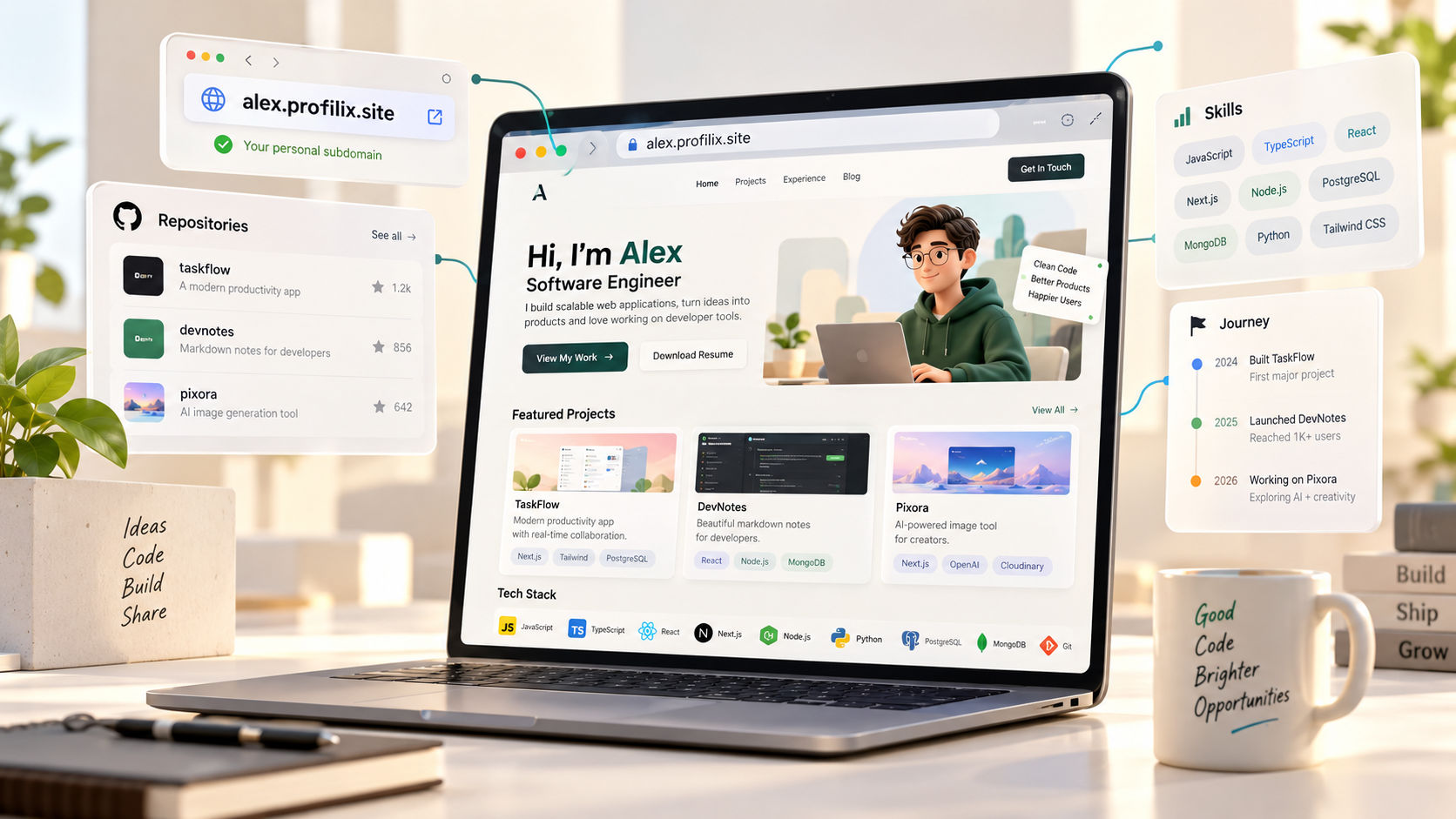
Imagine sharing a link like alex.profilix.site instead of sending someone through multiple profiles, repositories, and documents. They can visit one professional page to explore your projects, technical skills, experience, and contact information.
You don't necessarily need to buy a domain, configure a server, or spend an entire weekend building a website from scratch to get started.
A personal subdomain gives you a practical way to establish your online presence with a memorable URL.
In this guide, you'll learn what a personal subdomain is, why it matters for software engineers, how it compares with a custom domain, and how to claim a free developer portfolio subdomain using Profilix.
What Is a Personal Subdomain?
A subdomain is an address that sits beneath a primary domain.
For example, consider this URL:
alex.profilix.site
Its parts are:
alex is the subdomain.profilix.site is the primary domain.- Together, they form a unique address for a developer portfolio.
A platform can assign each user a subdomain and host their website there. This allows multiple people to publish separate websites under the same primary domain.
Here are a few illustrative examples:
| Purpose | Example URL |
|---|---|
| Developer portfolio | alex.profilix.site |
| Project showcase | projects.example.com |
| Developer blog | blog.example.com |
| API service | api.example.com |
The examples above illustrate common subdomain patterns. Availability depends on the domain owner and the platform's configuration.
A personal subdomain is especially useful when you want a professional web address without managing a separate domain and hosting setup yourself.
Why Every Software Engineer Should Consider a Personal Subdomain
A portfolio URL is more than a place to put your name. It can become the central destination for your professional work.
Here are seven reasons to consider creating one.
1. Give Your Projects One Professional Home
Software engineers often share their work across GitHub, LinkedIn, live demos, coding platforms, and resume documents.
That can make it difficult for someone to understand the full picture.
A personal portfolio brings these pieces together.
You can include:
- A short introduction
- Your technical skills
- Selected projects
- Live demonstrations
- GitHub repositories
- Internship and work experience
- Education and achievements
- Resume download
- Contact information
Instead of asking a recruiter to piece everything together, you give them one place to start.
For example, a student applying for a backend internship could feature a Spring Boot project, explain its API architecture, link the source code, and provide a demo if available.
That gives the visitor more context than a repository link alone.
2. Make Your Resume More Useful
Your resume has limited space.
You can describe a project in two or three bullet points, but a portfolio lets you explain it in more depth.
For each important project, you could include:
- The problem you wanted to solve
- Your approach
- The technologies you used
- Your individual contribution
- Important technical decisions
- Challenges you encountered
- Measurable results, if available
- Links to the source code and live application
Then add your portfolio URL to your resume.
A recruiter who wants more information can visit the website without searching for your other profiles.
A portfolio won't automatically guarantee an interview, but it can provide useful evidence of your skills and problem-solving ability.
3. Create a More Memorable Professional Identity
Compare these two ways of sharing your work.
Option A: A long collection of unrelated links.
Option B: One memorable portfolio address that brings your professional information together.
A subdomain can make your online presence easier to share in conversations, emails, applications, and networking events.
You can place it on:
- Your resume
- Your LinkedIn profile
- Your GitHub profile
- Your email signature
- Your digital profile card
- Your conference or hackathon introduction
The most important thing is not whether the URL looks impressive. It is whether the website behind it communicates your skills clearly.
4. Stand Out by Showing What You Can Build
Many developers can list React, Node.js, Java, or Python on a resume.
A portfolio gives you space to demonstrate how you use those technologies.
For example, a full-stack developer could present an application with authentication, database integration, API documentation, and deployment details.
A frontend developer could showcase responsive layouts, accessibility improvements, and reusable components.
A backend developer could explain API design, database indexing, caching, testing, and error handling.
These examples help visitors understand the work behind your technology stack.
You don't need dozens of projects. Start with two or three strong ones and explain them properly.
5. Build Your Online Presence Without Buying a Domain First
Registering a custom domain can be a good long-term investment, but it isn't a requirement for publishing your first portfolio.
A hosted subdomain can help you get started without separately purchasing a domain or configuring DNS records for one.
Depending on the platform, hosting may also include SSL, responsive layouts, and other infrastructure.
This is useful for:
- Computer science students
- Recent graduates
- Developers building their first portfolio
- Hackathon participants
- Open-source contributors
- Freelancers testing a professional presence
You can publish your work first and decide whether a custom domain is worth buying later.
Important distinction: A free subdomain is provided under a domain controlled by the platform. It is not the same as owning a registered custom domain such as alex.dev.
6. Make Sharing Your Work Easier at Hackathons and Interviews
Imagine meeting another developer at a college hackathon.
Instead of opening multiple apps to share your work, you can provide one portfolio URL.
The visitor can explore your projects, see your preferred technologies, review your experience, and find your GitHub profile.
The same approach works when connecting with recruiters, mentors, potential collaborators, and freelance clients.
A portfolio can also support your introduction during a technical interview by giving you a structured way to discuss your projects.
7. Build Something That Grows With Your Career
Your portfolio doesn't need to stay the same forever.
As you progress, you can add:
- Internship experience
- Professional projects
- Open-source contributions
- Technical articles
- Hackathon achievements
- Certifications
- Case studies
- New technical skills
Your website can evolve alongside your career.
Starting early also gives you a place to document projects while you are building them instead of trying to reconstruct everything when you begin applying for jobs.
Free Subdomain vs. Custom Domain: What's the Difference?
Both options can work well for a developer portfolio, but they serve slightly different needs.
| Feature | Free hosted subdomain | Custom domain |
|---|---|---|
| Example | alex.profilix.site | alex.dev |
| Separate domain purchase | Usually not required | Usually required |
| Hosting setup | Often managed by the platform | Depends on your hosting provider |
| Branding | Includes the platform's domain | Greater control over your domain name |
| DNS configuration | Often handled for you | May require configuration |
| Long-term portability | Depends on platform policies | You can generally move the domain between compatible providers |
| Ongoing cost | May be free within plan limits | Domain registration and renewal usually cost money |
A custom domain isn't automatically better for every developer.
If you're a student or a fresher, a clean, working subdomain can be perfectly suitable for a portfolio.
If you're building a long-term personal brand, running a freelance business, or want more control over your web address, buying a custom domain may be worthwhile.
Choose based on your goals and budget, not simply because someone says a paid domain is mandatory.
How to Claim Your Free Developer Subdomain on Profilix
Profilix provides hosted developer portfolios with branded subdomains, responsive themes, and automated SSL. Its core platform is advertised as free to use. You can explore the official portfolio features at Profilix Portfolio Builder.
Here is a straightforward way to get started.
Step 1: Open Profilix
Visit https://profilix.site/ and start creating your developer profile.
Follow the registration and onboarding instructions presented on the website.
Prepare the details you want to display publicly.
These may include:
- Your name and professional introduction
- A profile photo, if you want one
- Your primary technical skills
- Your education
- Relevant experience
- GitHub and LinkedIn links
- Contact information you are comfortable sharing
You don't need to have years of experience to create a useful profile.
If you're a student, you can focus on personal projects, coursework, hackathons, internships, and open-source contributions.
Step 3: Add Your Best Projects
Select projects that demonstrate your technical ability.
For each project, include a clear description, the technologies used, and your contribution.
Where possible, add links to the source code and a working demo.
Avoid publishing unfinished or broken links as featured work. A small collection of well-presented projects is a better starting point than a large collection with little context.
Step 4: Choose a Portfolio Theme
Select a layout that makes your work easy to understand.
A few useful choices include:
- Minimal: Best for a clean, straightforward professional presentation.
- Bento: Useful for organizing skills, projects, and achievements into sections.
- Terminal: A developer-oriented visual style that can suit a technical portfolio.
- Editorial: Useful for a polished presentation with a stronger emphasis on typography and case studies.
Choose readability over visual complexity. Your projects and experience should remain the main focus.
Step 5: Set Up Your Portfolio Subdomain
Open the portfolio setup or publishing options available in your Profilix account.
Choose an available username or subdomain if the interface offers that option. For example, a published address could follow this pattern:
yourusername.profilix.site
The exact URL depends on username availability and the platform's current rules.
Follow the publishing instructions shown in your account. The platform handles the hosting infrastructure for its supported subdomain setup.
Step 6: Publish and Test Your Website
Before sharing your portfolio, check it carefully.
- Open the public URL.
- Test it on a phone and a desktop browser.
- Verify your GitHub, LinkedIn, and project links.
- Check for spelling mistakes.
- Make sure your featured projects load correctly.
- Review what personal information is publicly visible.
- Confirm that the published site uses HTTPS.
Once everything looks correct, add the URL to your resume and relevant professional profiles.
Start here: Visit Profilix to explore the portfolio builder and its available features.
Plan details and eligibility can change, so check the current interface and pricing information before assuming a particular feature or usage limit is free.
What Should Your Developer Portfolio Include?
A subdomain is only the address. The content is what makes the website useful.
If you're unsure where to start, use this structure.
1. A Clear Introduction
Explain who you are, what you build, and which kinds of problems interest you.
For example:
I'm a software developer focused on building full-stack web applications using Java, Spring Boot, React, and PostgreSQL. I enjoy designing reliable APIs and turning ideas into practical products.
Adapt the wording to your actual skills and interests.
2. A Focused Skills Section
Group related technologies instead of listing every tool you've ever tried.
For example:
- Languages: Java, JavaScript, TypeScript
- Frontend: React, Next.js, CSS
- Backend: Node.js, Express, Spring Boot
- Databases: PostgreSQL, MongoDB
- Tools: Git, Docker, Postman
Include only technologies you can reasonably discuss in an interview.
3. Two or Three Strong Projects
For each project, explain the problem, your solution, your contribution, and the technologies used.
Include measurable outcomes when you have reliable data.
4. Your Experience and Achievements
Add relevant internships, professional experience, open-source contributions, and hackathon achievements.
Make your role and contribution clear. Avoid presenting a team's achievement as entirely your own work.
5. A Downloadable Resume
Give visitors a convenient way to access your resume in a standard format.
Check that the file is current and that its contact details match your portfolio.
Provide an appropriate professional contact method.
You can include an email address or a contact link, depending on your privacy preferences.
Common Mistakes to Avoid
Creating a subdomain is a useful first step, but a few mistakes can reduce its value.
Choosing a confusing username
Prefer something professional, recognizable, and easy to type. Avoid unnecessary strings of numbers or usernames you may regret using publicly.
Spending too much time on animations
A visually impressive portfolio is helpful only when the content remains readable and the site works reliably. Avoid effects that slow down the experience or distract visitors from your projects.
Listing skills without demonstrating them
Use project descriptions to show how you applied your skills rather than relying entirely on technology badges.
Publishing unfinished information
Review project links, resume files, spelling, and contact details before sharing the website.
Assuming a subdomain is permanent
A free subdomain depends on the provider's policies and continued availability of the service. Review the platform's terms, account requirements, and export options before relying on it as your only professional address.
Sharing unnecessary personal information
Your portfolio is public. Include professional information that helps people evaluate your work, but avoid publishing private contact details or sensitive personal information.
Frequently Asked Questions
Is a free subdomain good enough for a software engineer?
Yes. A free subdomain can be a practical starting point for students, freshers, and developers who want to publish their work without buying a domain. The quality and relevance of your portfolio matter more than whether the address uses a free subdomain.
Do I need to know web development to create a portfolio?
Not necessarily. A portfolio builder can handle much of the layout and hosting work. You can focus on adding your projects, skills, and professional information.
Is a subdomain the same as a custom domain?
No. A subdomain exists beneath a parent domain controlled by its owner. A custom domain is a separately registered domain name that you control through your registrar, subject to the registration terms.
Can I put a portfolio subdomain on my resume?
Yes. Add the URL near your contact details, alongside relevant links such as GitHub and LinkedIn. Make sure the website is public and the links work.
Will having a portfolio guarantee a job?
No. A portfolio can help you demonstrate your work, but hiring decisions depend on many factors, including relevant skills, experience, interviews, and the employer's requirements.
Can I switch to a custom domain later?
That depends on the platform's supported domain settings and your plan. Before switching, check whether you can connect a custom domain, redirect the old address, and preserve links to existing work.
Final Thoughts
A personal subdomain is a simple way to give your professional work a home on the internet.
It helps bring your projects, skills, experience, and resume together under one shareable address. You can start without buying a separate domain, build your portfolio as you gain experience, and consider a custom domain when your needs change.
You don't need a perfect website to begin. You need a clear introduction, a few meaningful projects, and a link that works.
If you want a straightforward starting point, explore Profilix and see how its developer portfolio tools can help you publish a professional online presence.
Your code deserves more than a repository link. Give your work a place people can explore.
Note: Subdomain availability, plan limits, and platform features may change. Confirm the current terms on the provider's website before publishing.